

Designing a label that looks great on screen is one thing.
Designing a label that prints perfectly on press is another.
At LabelDesign.ai, we regularly partner with digital label companies and print shops to supply production-ready, compliant, press-friendly files — and we’ve seen firsthand what causes delays, reprints, and costly mistakes.
So today, we’re sharing what print shops really wish brands understood about label design.
If you want smoother production, better color accuracy, and zero last-minute headaches — this is for you.
1. RGB Files Don’t Belong on a Printing Press
One of the most common issues print shops encounter?
Files built in RGB instead of CMYK.
Your label might glow on a laptop screen — but printing presses operate in CMYK color space. When RGB files are converted at the last minute, colors shift. Bright blues dull. Neons disappear. Brand colors drift.
What print shops wish you’d do:
- Design in CMYK from the start
- Understand that certain digital colors can’t be replicated in print
- Request physical proofs when color accuracy matters
At LabelDesign.ai, every final file is prepared in the correct color profile for the intended press.
Because what looks good on screen should look just as good on shelf.
2. Bleed Isn’t Optional
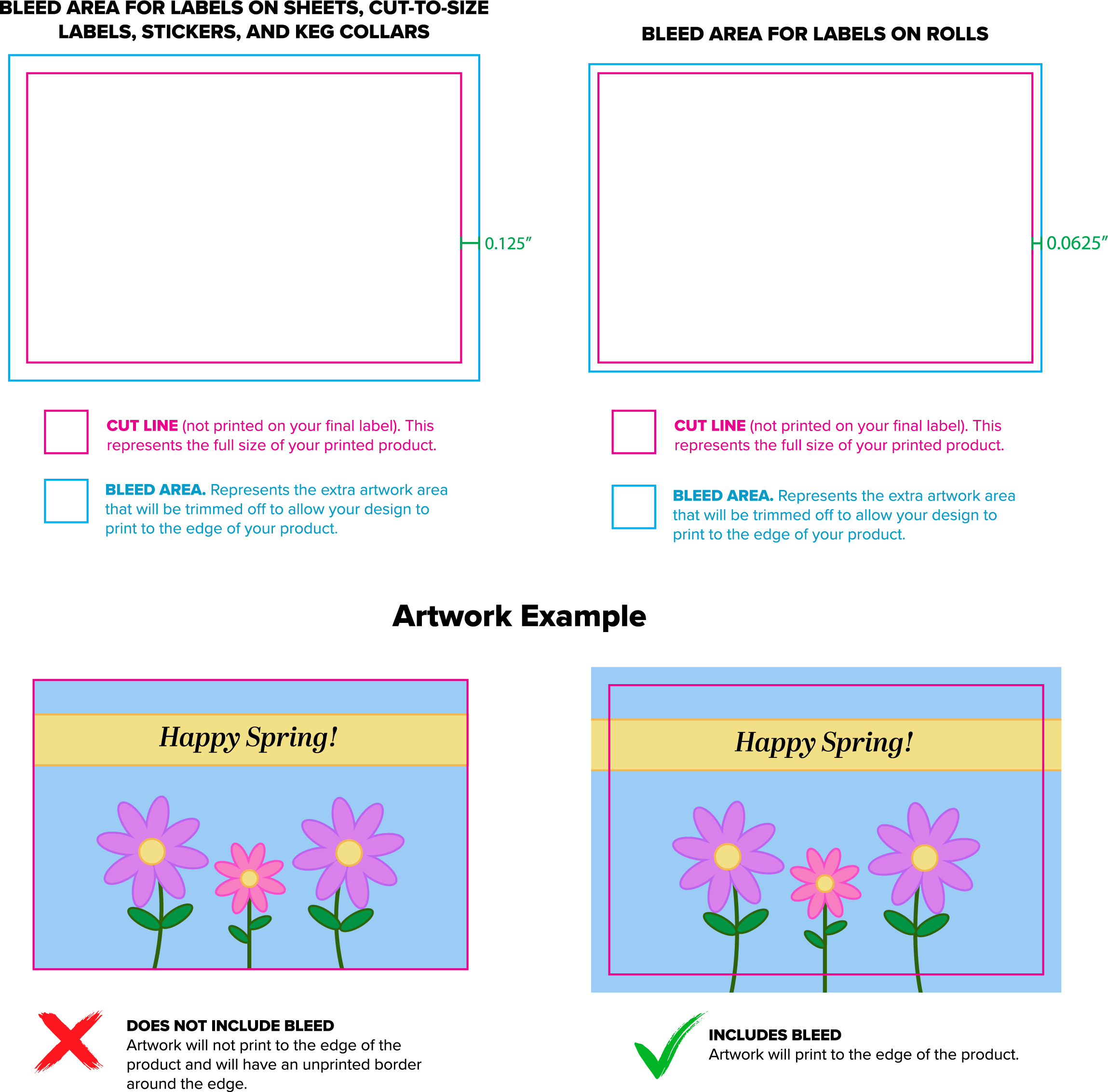

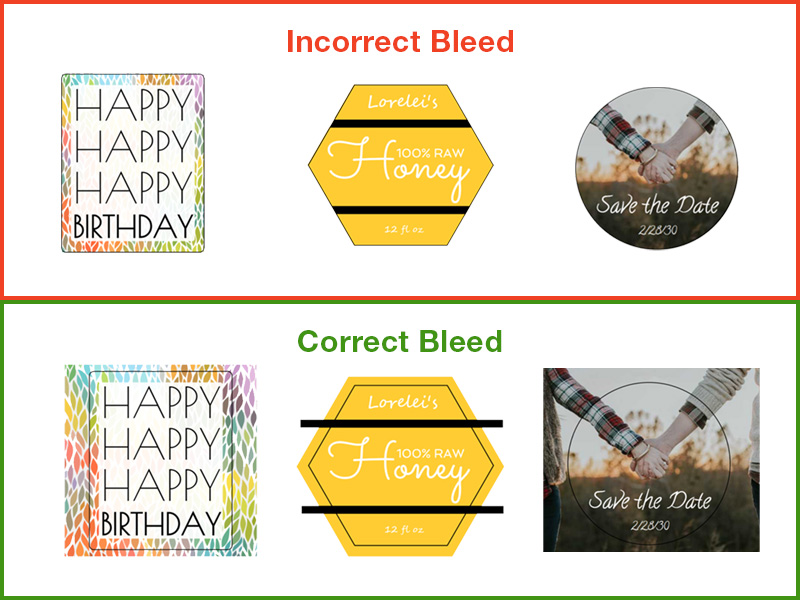
Bleed is the extra artwork area that extends beyond the trim line.
Without proper bleed:
- You risk white edges
- Die cuts may slice into artwork
- Reprints become inevitable
Most print shops require at least 0.125” (1/8 inch) bleed — sometimes more for specialty labels.
What print shops wish you’d do:
- Extend background colors and images past the trim line
- Keep critical text inside the safe zone
- Ask for the die line before finalizing layout
Our human designers double-check bleed, trim, and safe areas before exporting files — every time.
AI helps with speed.
Humans make sure it prints correctly.
3. Fonts Must Be Outlined
If you send editable fonts without outlining them, the printer may not have the same typeface installed. That means font substitution. That means broken layouts.
What print shops wish you’d do:
- Convert fonts to outlines before delivery
- Avoid missing font packages
- Keep editable versions separate from production files
We always deliver:
- Print-ready PDF
- Outlined typography
- Organized layers when required
No surprises at press time.
4. Resolution Matters More Than You Think
Low-resolution images might look fine at small sizes on screen — but once enlarged or printed at high DPI, they pixelate.
For professional label printing:
- 300 DPI at final size is standard
- Vector artwork is preferred whenever possible
- AI-generated images must be upscaled properly
This is where our studio approach matters.
Yes, we leverage AI to generate creative concepts — but our human designers refine, enhance, vectorize, and prepare artwork for real-world production.
That’s the difference between “cool idea” and “print-ready asset.”
5. Transparency & Special Finishes Require Planning


Want:
- Clear labels?
- Spot gloss?
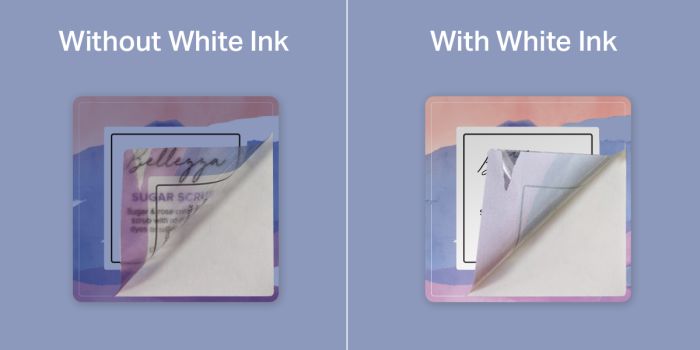
- White ink underprint?
- Foil stamping?
These aren’t afterthoughts. They require:
- Separate layers
- Correct spot color naming
- Overprint settings
- Proper file structure
Print shops wish brands would design with the finish in mind from the beginning — not tack it on at the end.
When we create labels, we ask about:
- Substrate type
- Application method
- Finish preferences
- Press specifications
Because design decisions affect production cost and feasibility.
6. Compliance Isn’t the Printer’s Job
For beverage brands especially (and you know we work with many), missing required information causes delays.
Print shops are not responsible for:
- TTB compliance
- Barcode scannability
- Ingredient formatting
- Net contents placement
They will print what you send.
It’s your job — or your design studio’s job — to make sure it’s correct.
At LabelDesign.ai, we handle:
- Proper layout spacing
- Barcode sizing
- Regulatory positioning
- Converting existing artwork into compliant, print-ready files
You brew great beer.
We make sure the label prints without issues.
7. Last-Minute Edits Cost Everyone
Changing copy after proof approval?
Swapping images after files are built?
Adjusting die lines post-layout?
Each change adds:
- Time
- Prepress costs
- Scheduling shifts
Print shops wish brands finalized content before sending files to production.
Our process is built to prevent that:
- Concept
- Refinement
- Production file preparation
- Final approval
- Delivery
Clear structure = smooth production.
The Real Secret Print Shops Won’t Say Out Loud
They love working with designers who understand production.
When files are clean, compliant, layered correctly, color-calibrated, and properly exported — everything runs smoother.
That’s why so many digital label companies and print partners collaborate with us.
We’re not just generating artwork.
We’re delivering production-ready design.
Why This Matters for Your Brand
A label that looks amazing but prints poorly:
- Damages brand perception
- Wastes inventory
- Costs money in reprints
- Delays launches
A label designed correctly from the beginning:
- Prints cleanly
- Applies smoothly
- Matches brand colors
- Moves to market faster
That’s the advantage of working with an AI-Assisted Digital Label Design Studio that understands real-world production.
AI accelerates creativity.
Humans ensure precision.
Final Thoughts
If your printer has ever said:
- “We need bleed added.”
- “These fonts aren’t outlined.”
- “This file is RGB.”
- “Can you resend this as press-ready?”
You’re not alone.
The good news? It’s fixable.
And it’s preventable.
Ready for a Label That’s Designed to Print?
Whether you need:
- A brand-new label
- A small batch release
- A compliant file conversion
- Or production-ready artwork for your print partner
We’ve got you covered.
👉 Start Your Label Design Today
LabelDesign.ai
AI Generated. Human Perfected.